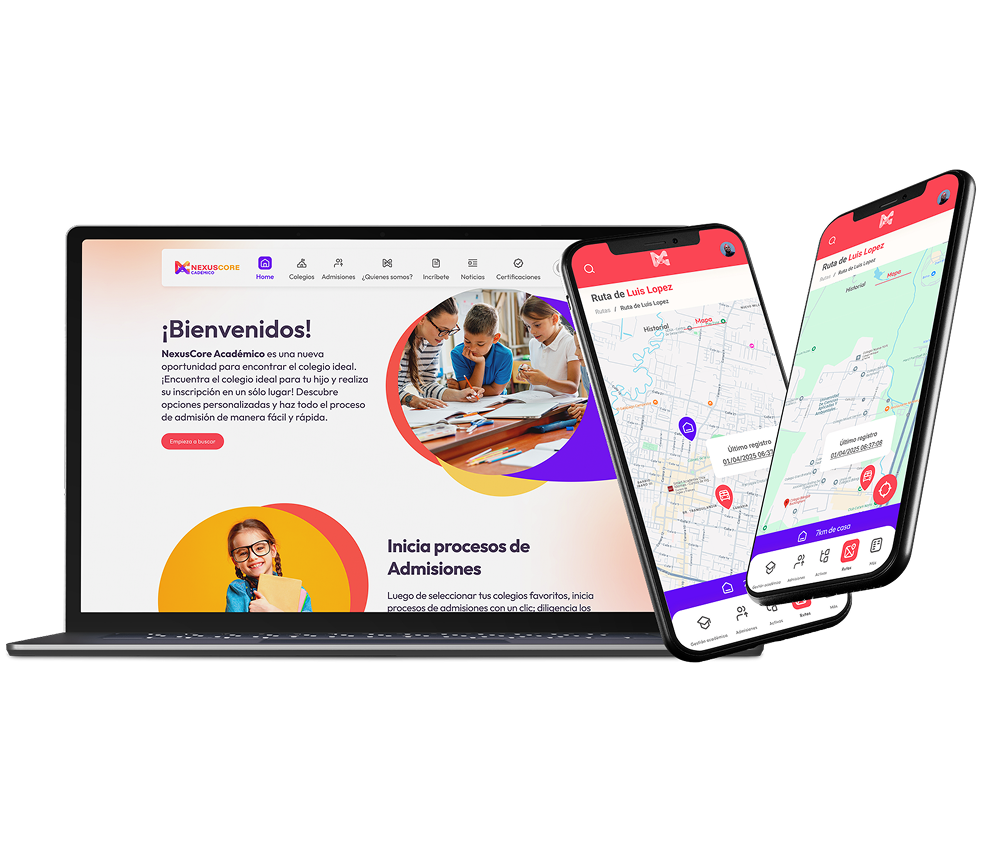
A full-stack school administration platform — web app for administrators and teachers, mobile app for parents — covering enrollment, academic records, attendance, and communication.
Overview
Nexus Core is a school administration system used by private K-12 institutions. It manages enrollment workflows, academic records, attendance, teacher scheduling, and parent communication — all in one platform.
The challenge: three distinct user types with completely different mental models. School administrators think in processes and reports. Teachers think in classroom-scale interactions. Parents think in individual child milestones. Designing one system that serves all three without complexity leaking between them was the core problem.
Scope
Web app (admin + teacher roles) + companion mobile app (parent role) + shared design system connecting both platforms.
01 — User Research
I conducted role-based research sessions: 4 administrators, 6 teachers, and 8 parents across 3 schools. The most important finding was that administrators and teachers had opposite mental models for the same data — what an administrator calls "enrollment status" is what a teacher calls "who's in my class."
School Administrator
Classroom Teacher
Parent / Guardian
02 — Web Application
The web app uses a role-based layout system — the same navigation shell renders differently based on user role. Administrators see macro-level dashboards and management tools. Teachers see classroom-level views and grading interfaces. Permissions determine what each role can read and write.
Administrator view — macro enrollment and records
Teacher role — classroom grading
Admin role — enrollment workflow
03 — Mobile Application
The parent mobile app strips away administrative complexity entirely. Parents see only their child's information: grades, attendance, homework, and messages from teachers. The design principle was "one child, one screen" — no list views, no aggregation, just direct access to what parents actually check.
Child overview
Academic record
Monthly calendar
Teacher communication
04 — Design System
I built a shared token system that both the web app and mobile app consume. Colors, typography scale, spacing, and border radius all live in a single source of truth — the platforms diverge at the component level, but share the same visual language.
32 web components
24 mobile components
05 — Results
3
Schools onboarded in the first semester
56
Documented components across both platforms
4.4
Parent app satisfaction score (out of 5)